Author: Muzammil Hassan
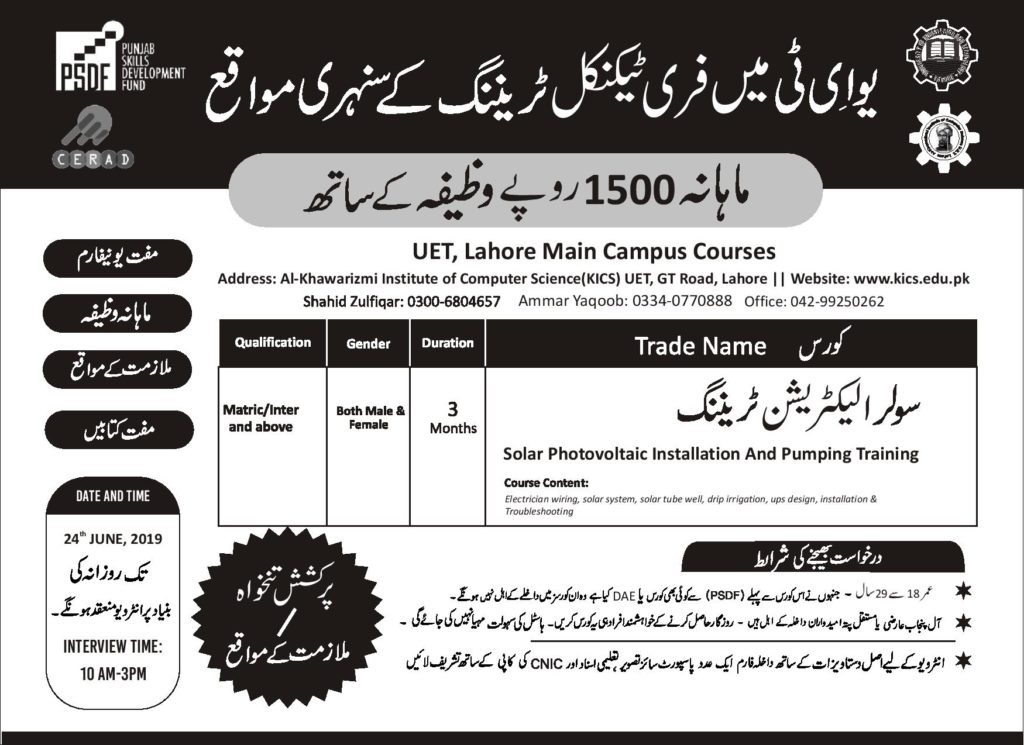
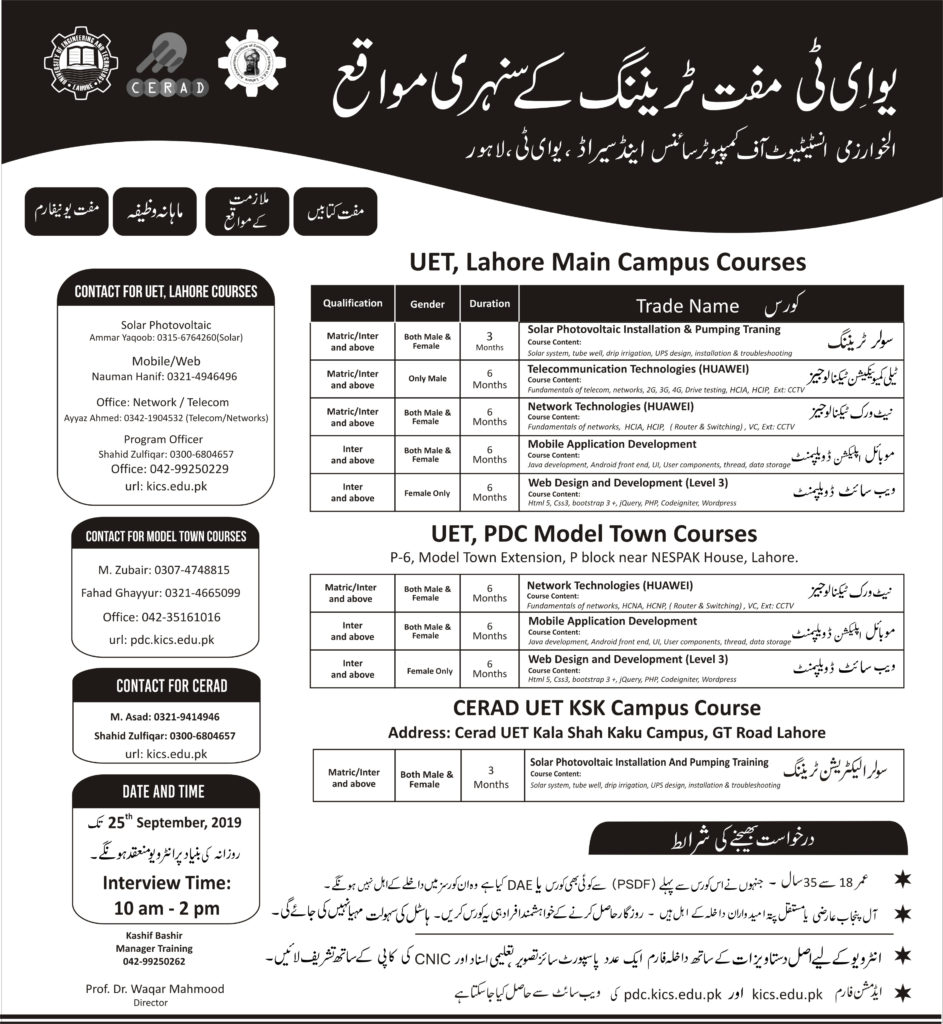
PSDF Free Technical Training Courses
Location 1= UET main campus Download Application Form
Location 2= PDC Model Town campus Download Application Form
Location 3=CERAD UET KalaShah Kaku campus Download Application Form
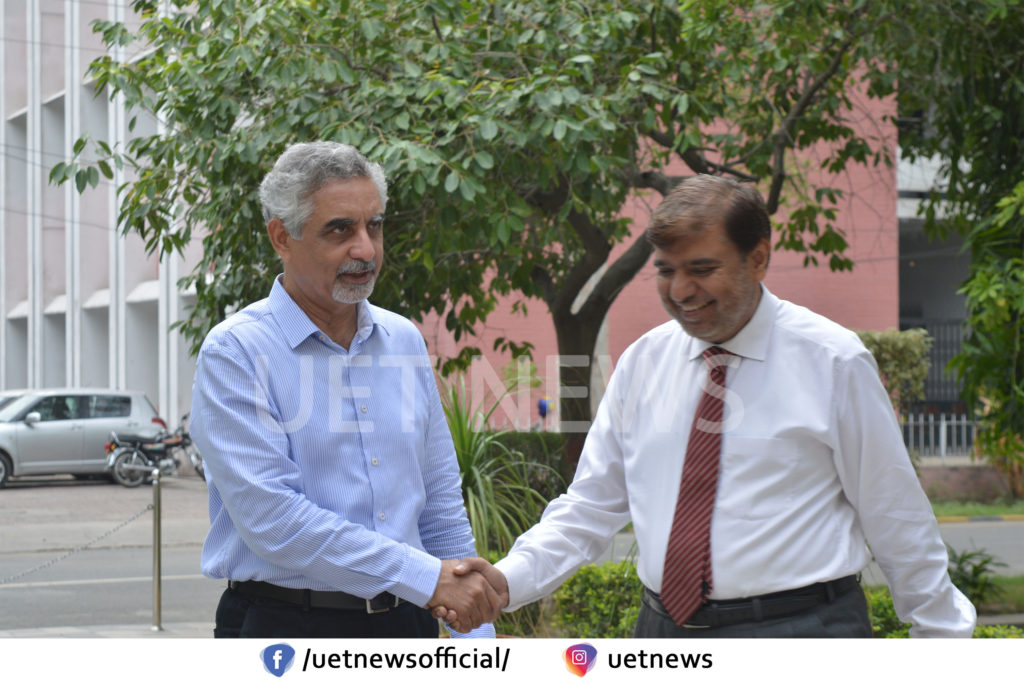
New Vice Chancellor of UET Lahore Dr. Mansoor Sarwar Visits KICS
Vice Chancellor UET Lahore Prof. Dr. Mansoor Sarwar visited Al-Khawarazmi Institute of Computer Science (KICS) UET on 9th July 2019. Prof. Dr. Waqar Mahmood, Director KICS, welcomed him. A meeting was held at a conference room where the management team of Al-Khawarazmi Institute was present as well. Dr. Waqar briefed the Vice Chancellor about the research activities being happened at the labs of KICS. He then also gave a presentation on CERAD UET where research works and testing facilities are happening on the fields of energy and renewable energy, etc.
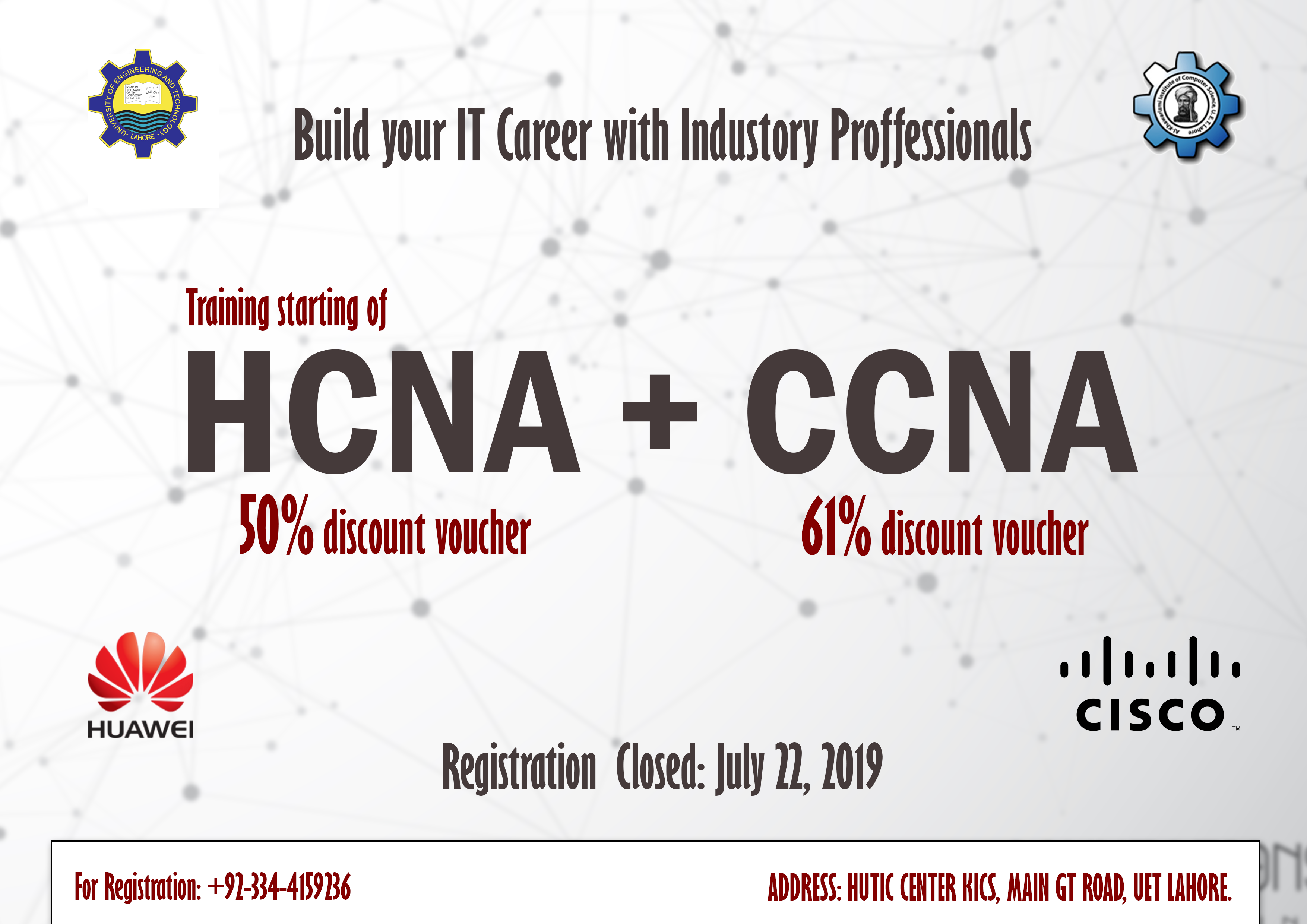
Networking Courses Cisco & Huawei Certification
KICS, UET Lahore is offering Networking Courses.
Special Summer discounted vouchers.
50% discount for UETIANS
20% Group Discount
For more details contact: 03214946496, 03344159236
Networking Courses
CISCO CERTIFICATION
Course Name: CCNA
CCNA Course Outline:
Module 1 Network Fundamentals
1.1 Compare and contrast OSI and TCP/IP models
1.2 Compare and contrast TCP and UDP protocols
1.3 Describe the impact of infrastructure components in an enterprise network
- 3.a Firewalls
- 3.b Access points
- 3.c Wireless controllers
1.4 Describe the effects of cloud resources on enterprise network architecture
- 4.a Traffic path to internal and external cloud services
- 4.b Virtual services
- 4.c Basic virtual network infrastructure
1.5 Compare and contrast collapsed core and three-tier architectures
1.6 Compare and contrast network topologies
- 6.a Star
- 6.b Mesh
- 6.c Hybrid
1.7 Select the appropriate cabling type based on implementation requirements
1.8 Apply troubleshooting methodologies to resolve problems
- 8.a Perform and document fault isolation
- 8.b Resolve or escalate
- 8.c Verify and monitor resolution
1.9 Configure, verify, and troubleshoot IPv4 addressing and subnetting
1.10 Compare and contrast IPv4 address types
- 10.a Unicast
- 10.b Broadcast
- 10.c Multicast
1.11 Describe the need for private IPv4 addressing
1.12 Identify the appropriate IPv6 addressing scheme to satisfy addressing requirements in a LAN/WAN environment
1.13 Configure, verify, and troubleshoot IPv6 addressing
1.14 Configure and verify IPv6 Stateless Address Auto Configuration
1.15 Compare and contrast IPv6 address types
- 15.a Global unicast
- 15.b Unique local
- 15.c Link local
- 15.d Multicast
- 15.e Modified EUI 64
- 15.f Autoconfiguration
- 15.g Anycast
Module 2: LAN Switching Technologies
2.1 Describe and verify switching concepts
- 1.a MAC learning and aging
- 1.b Frame switching
- 1.c Frame flooding
- 1.d MAC address table
2.2 Interpret Ethernet frame format
2.3 Troubleshoot interface and cable issues (collisions, errors, duplex, speed)
2.4 Configure, verify, and troubleshoot VLANs (normal/extended range) spanning multiple switches
- 4.a Access ports (data and voice)
- 4.b Default VLAN
2.5 Configure, verify, and troubleshoot interswitch connectivity
- 5.a Trunk ports
- 5.b Add and remove VLANs on a trunk
- 5.c DTP, VTP (v1&v2), and 802.1Q
- 5.d Native VLAN
2.6 Configure, verify, and troubleshoot STP protocols
- 6.a STP mode (PVST+ and RPVST+)
- 6.b STP root bridge selection
2.7 Configure, verify and troubleshoot STP related optional features
- 7.a PortFast
- 7.b BPDU guard
2.8 Configure and verify Layer 2 protocols
- 8.a Cisco Discovery Protocol
- 8.b LLDP
2.9 Configure, verify, and troubleshoot (Layer 2/Layer 3) EtherChannel
- 9.a Static
- 9.b PAGP
- 9.c LACP
2.10 Describe the benefits of switch stacking and chassis aggregation
Module 3: Routing Technologies
3.1 Describe the routing concepts
- 1.a Packet handling along the path through a network
- 1.b Forwarding decision based on route lookup
- 1.c Frame rewrite
3.2 Interpret the components of a routing table
- 2.a Prefix
- 2.b Network mask
- 2.c Next hop
- 2.d Routing protocol code
- 2.e Administrative distance
- 2.f Metric
- 2.g Gateway of last resort
3.3 Describe how a routing table is populated by different routing information sources
- 3.a Admin distance
3.4 Configure, verify, and troubleshoot inter-VLAN routing
- 4.a Router on a stick
- 4.b SVI
3.5 Compare and contrast static routing and dynamic routing
3.6 Compare and contrast distance vector and link state routing protocols
3.7 Compare and contrast interior and exterior routing protocols
3.8 Configure, verify, and troubleshoot IPv4 and IPv6 static routing
- 8.a Default route
- 8.b Network route
- 8.c Host route
- 8.d Floating static
3.9 Configure, verify, and troubleshoot single area and multi-area OSPFv2 for IPv4 (excluding authentication, filtering, manual summarization, redistribution, stub, virtual-link, and LSAs)
3.10 Configure, verify, and troubleshoot single area and multi-area OSPFv3 for IPv6 (excluding authentication, filtering, manual summarization, redistribution, stub, virtual-link, and LSAs)
3.11 Configure, verify, and troubleshoot EIGRP for IPv4 (excluding authentication, filtering, manual summarization, redistribution, stub)
3.12 Configure, verify, and troubleshoot EIGRP for IPv6 (excluding authentication, filtering, manual summarization, redistribution, stub)
3.13 Configure, verify, and troubleshoot RIPv2 for IPv4 (excluding authentication, filtering, manual summarization, redistribution)
3.14 Troubleshoot basic Layer 3 end-to-end connectivity issues
Module 4: WAN Technologies
4.1 Configure and verify PPP and MLPPP on WAN interfaces using local authentication
4.2 Configure, verify, and troubleshoot PPPoE client-side interfaces using local authentication
4.3 Configure, verify, and troubleshoot GRE tunnel connectivity
4.4 Describe WAN topology options
- 4.a Point-to-point
- 4.b Hub and spoke
- 4.c Full mesh
- 4.d Single vs dual-homed
4.5 Describe WAN access connectivity options
- 5.a MPLS
- 5.b Metro Ethernet
- 5.c Broadband PPPoE
- 5.d Internet VPN (DMVPN, site-to-site VPN, client VPN)
4.6 Configure and verify single-homed branch connectivity using eBGP IPv4 (limited to peering and route advertisement using Network command only)
4.7 Describe basic QoS concepts
- 7.a Marking
- 7.b Device trust
- 7.c Prioritization
- 7.c. [i] Voice
- 7.c. [ii] Video
- 7.c. [iii] Data
- 7.d Shaping
- 7.e Policing
- 7.f Congestion management
Module 5: Infrastructure Services
5.1 Describe DNS lookup operation
5.2 Troubleshoot client connectivity issues involving DNS
5.3 Configure and verify DHCP on a router (excluding static reservations)
- 3.a Server
- 3.b Relay
- 3.c Client
- 3.d TFTP, DNS, and gateway options
5.4 Troubleshoot client- and router-based DHCP connectivity issues
5.5 Configure, verify, and troubleshoot basic HSRP
- 5.a Priority
- 5.b Preemption
- 5.c Version
5.6 Configure, verify, and troubleshoot inside source NAT
- 6.a Static
- 6.b Pool
- 6.c PAT
5.7 Configure and verify NTP operating in a client/server mode
Module 6: Infrastructure Security
6.1 Configure, verify and troubleshoot port security
- 1.a Static
- 1.b Dynamic
- 1.c Sticky
- 1.d Max MAC addresses
- 1.e Violation actions
- 1.f Err-disable recovery
6.2 Describe common access layer threat mitigation techniques
- 2.a 802.1x
- 2.b DHCP snooping
- 2.c Nondefault native VLAN
6.3 Configure, verify and troubleshoot IPv4 and IPv6 access list for traffic filtering
- 3.a Standard
- 3.b Extended
- 3.c Named
6.4 Verify ACLs using the APIC-EM Path Trace ACL analysis tool
6.5 Configure, verify and troubleshoot basic device hardening
- 5.a Local authentication
- 5.b Secure password
- 5.c Access to device
- 5.c. [i] Source address
- 5.c. [ii] Telnet/SSH
- 5.d Login banner
6.6 Describe device security using AAA with TACACS+ and RADIUS
Module 7: Infrastructure Management
7.1 Configure and verify device-monitoring protocols
- 1.a SNMPv2
- 1.b SNMPv3
- 1.c Syslog
7.2 Troubleshoot network connectivity issues using ICMP echo-based IP SLA
7.3 Configure and verify device management
- 3.a Backup and restore device configuration
- 3.b Using Cisco Discovery Protocol or LLDP for device discovery
- 3.c Licensing
- 3.d Logging
- 3.e Timezone
- 3.f Loopback
7.4 Configure and verify initial device configuration
7.5 Perform device maintenance
- 5.a Cisco IOS upgrades and recovery (SCP, FTP, TFTP, and MD5 verify)
- 5.b Password recovery and configuration register
- 5.c File system management
7.6 Use Cisco IOS tools to troubleshoot and resolve problems
- 6.a Ping and traceroute with extended option
- 6.b Terminal monitor
- 6.c Log events
- 6.d Local SPAN
7.7 Describe network programmability in enterprise network architecture
- 7.a Function of a controller
- 7.b Separation of control plane and data plane
- 7.c Northbound and southbound APIs
HUAWEI Certification
Course Name: HCNA/HCIA
HCNA Course Outline
Module 1: IP Network Principles
Module 2: LAN Technologies
Module 3: WAN Technologies
Module 4: Routing Technologies
Module 5: Network Security
Module 6: Network Management
Module 7: IPv6 Networks
Chinese Delegation Visits UET to Set Up Smart Classrooms
Chinese government has decided to set up 150 smart classrooms in various universities of Pakistan. A delegation from China in this regard visited University of Engineering and Technology Lahore on 1st July 2019. The delegation met Vice Chancellor UET Prof. Dr. Syed Mansoor Sarwar at his office where Dean Department of Electrical Engineering Dr. Tahir Izhar, Director KICS UET Prof. Dr. Waqar Mahmood, Dean Department of Natural Sciences Dr. Shahid Rafique and other faculty members too met them. Continue reading
2nd Merit List Solar Photovoltaic Installation and Pumping Training J9-074-010
|
Sr. |
Name |
Father Name |
|
1 |
Abdul Mujeeb |
Ejaz Ahmed |
|
2 |
Abdul Rasool |
Muhammad Munir |
|
3 |
Abdullah Arif |
Muhammad Arif Bhatti |
|
4 |
Abdullah Shahzad |
Shahzad Manzoor |
|
5 |
Ali Hassan |
Ishfaq Ahmad |
|
6 |
Ali Raza Azmat |
Azmat Ali |
|
7 |
Attique Ur Rehman |
Umer Daraz |
|
8 |
H.M Bilal Hussain |
Muhammad Aslam |
|
9 |
Hifza Amir |
Amir Nazir khokhar |
|
10 |
Israr Hamza |
Tariq Mahmood |
|
11 |
Muhammad Abu Bakkar |
Muhammad Ishaq |
|
12 |
Muhammad Adeel Aslam |
Muhammad Aslam |
|
13 |
Muhammad Ali Khurram |
Khurram Shahzad |
|
14 |
Muhammad Azmeer Ali |
Imtiaz Hussain |
|
15 |
Muhammad Bilal |
Muhammad Sajid |
|
16 |
Muhammad Faiq |
Muhammad Mushtaq |
|
17 |
Muhammad Hasnat Ali |
Muhammad Ramzan Ishrat |
|
18 |
Muhammad Kumail Askari |
Syed Tauqir Hussain Askari |
|
19 |
Muhammad Nabeel Naseer |
Muhammad Naseer Ahmad |
|
20 |
Muhammad Riaz Ahmad |
Muhammad Ahmad |
|
21 |
Muhammad Umair Safeer |
Muhammad Safeer |
|
22 |
Nasir Subhani |
Muhammad Tahir |
|
23 |
Sajawal |
Sana Ullah |
|
24 |
Tayyab Younas |
Muhammad Younas |
|
25 |
Usama Kawash |
Tariq Mahmood |
|
26 |
Waqas |
Sagheer Ahmad |
|
27 |
Waqas Ali |
Muhammad Arslan |
|
28 |
Zulfiqar Ali |
Nisar Ahmed |
1st Merit List Solar Photovoltaic Installation and Pumping Training J9-074-010
|
Sr # |
Applicant Name |
Father Name |
|
1 |
Ali Raza Azmat |
Azmat Ali |
|
2 |
Abdullah Shahzad |
Shahzad Manzoor |
|
3 |
Nasir Subhani |
Muhammad Tahir |
|
4 |
Muhammad Hasnat Ali |
Muhammad Ramzan Ishrat |
|
5 |
Waqas Ali |
Muhammad Arslan |
|
6 |
Hafiz Muhammad Usman |
Muhammad Yaqoob |
|
7 |
Abdul Rasool |
Muhammad Munir |
|
8 |
Ali Hassan |
Ishfaq Ahmad |
|
9 |
Muhammad Abu Bakkar |
Muhammad Ishaq |
|
10 |
Abdul Mujeeb |
Ejaz Ahmed |
|
11 |
Hifza Amir |
Amir Nazir khokhar |
|
12 |
Tayyab Younas |
Muhammad Younas |
|
13 |
Muhammad Faiq |
Muhammad Mushtaq |
|
14 |
Muhammad Bilal |
Muhammad Sajid |
|
15 |
Zulfiqar Ali |
Nisar Ahmed |
|
16 |
Muhammad Adeel Aslam |
Muhammad Aslam |
|
17 |
Abdullah Arif |
Muhammad Arif Bhatti |
|
18 |
Muhammad Kumail Askari |
Syed Tauqir Hussain Askari |
|
19 |
Muhammad Riaz Ahmad |
Muhammad Ahmad |
|
20 |
Muhammad Azmeer Ali |
Imtiaz Hussain |
|
21 |
Usama Kawash |
Tariq Mahmood |
|
22 |
Attique Ur Rehman |
Umer Daraz |
|
23 |
Shehroz Arshad |
Naeem Arshad |
|
24 |
Muhammad Ali Khurram |
Khurram Shahzad |
|
25 |
Waqas |
Sagheer Ahmad |
|
26 |
Muhammad Nabeel Naseer |
Muhammad Naseer Ahmad |
|
27 |
Hamid Mahmood |
Asif Mahmood |
|
28 |
Muhammad Umair Safeer |
Muhammad Safeer |
|
29 |
Sajawal |
Sana Ullah |
Director KICS UET Hosts an Iftar Party
Director KICS UET Dr. Waqar Mahmood hosted an Iftar Party on Monday, May 27th by the side of swimming pool area in University of Engineering and Technology Lahore. Entire KICS staff and UET’s faculty attended the iftar party. Continue reading